Use pgvectorscale to build scalable AI applications with higher performance, embedding search and cost-efficient storage.


pgvectorscale complements pgvector, the open-source vector data extension for PostgreSQL, and introduces the following key innovations:
- A new index type called StreamingDiskANN, inspired by the DiskANN algorithm, based on research from Microsoft
- Statistical Binary Quantization: developed by Timescale researchers, This compression method improves on standard Binary Quantization.
Timescale’s benchmarks reveal that with pgvectorscale, PostgreSQL achieves 28x lower p95 latency, and 16x higher query throughput than Pinecone for approximate nearest neighbor queries at 99% recall.
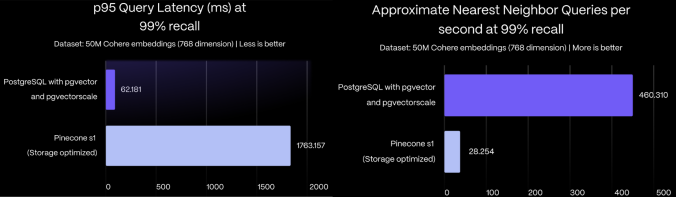
PostgreSQL costs are 21% those of Pinecone s1, just saying.
For more information about pgvectorscale performance, see the benchmarking blog post.
In contrast to pgvector, which is written in C, pgvectorscale is developed in Rust using the PGRX framework, offering the PostgreSQL community a new avenue for contributing to vector support.
App developer or DBAs can use pgvectorscale with their PostgreSQL databases.
If you want to contribute to this extension, see how to build pgvectorscale from source in a developer environment.
The fastest ways to run PostgreSQL with pgvectorscale are:
- Using a pre-built Docker container
- Installing from source
- Enable pgvectorscale in a Timescale Cloud service
-
Connect to your database:
psql -d "postgres://<username>:<password>@<host>:<port>/<database-name>" -
Create the pgvectorscale extension:
CREATE EXTENSION IF NOT EXISTS vectorscale CASCADE;
The
CASCADEautomatically installspgvector.
You can install pgvectorscale from source and install it in an existing PostgreSQL server
-
Compile and install the extension
# install prerequisites
## rust
curl --proto '=https' --tlsv1.2 -sSf https://sh.rustup.rs | sh
## pgrx
cargo install --locked cargo-pgrx
cargo pgrx init --pg16 pg_config

#download, build and install pgvectorscale
cd /tmp
git clone --branch <version> https://github.com/timescale/pgvectorscale
cd pgvectorscale/pgvectorscale
cargo pgrx install --release
You can also take a look at our documentation for extension developers for more complete instructions.
-
Connect to your database:
psql -d "postgres://<username>:<password>@<host>:<port>/<database-name>" -
Create the pgvectorscale extension:
CREATE EXTENSION IF NOT EXISTS vectorscale CASCADE;
The
CASCADEautomatically installspgvector.
To enable pgvectorscale:
-
Create a new Timescale Service.
If you want to use an existing service, pgvectorscale is added as an available extension on the first maintenance window after the pgvectorscale release date.
-
Connect to your Timescale service:
psql -d "postgres://<username>:<password>@<host>:<port>/<database-name>" -
Create the pgvectorscale extension:
CREATE EXTENSION IF NOT EXISTS vectorscale CASCADE;The
CASCADEautomatically installspgvector.
-
Create a table with an embedding column. For example:
CREATE TABLE IF NOT EXISTS document_embedding ( id BIGINT PRIMARY KEY GENERATED BY DEFAULT AS IDENTITY, metadata JSONB, contents TEXT, embedding VECTOR(1538) ) -
Populate the table.
For more information, see the pgvector instructions and list of clients.
-
Create a StreamingDiskANN index on the embedding column:
CREATE INDEX document_embedding_idx ON document_embedding USING diskann (embedding); -
Find the 10 closest embeddings using the index.
SELECT *
FROM document_embedding
ORDER BY embedding <=> $1
LIMIT 10
Note: pgvectorscale currently support cosine distance (
<=>) queries. If you would like additional distance types, create an issue.
The StreamingDiskANN index comes with smart defaults but also the ability to customize it's behavior. There are two types of parameters: index build-time parameters that are specified when an index is created and query-time parameters that can be tuned when querying an index.
We suggest setting the index build-time paramers for major changes to index operations while query-time parameters can be used to tune the accuracy/performancy tradeoff for individual queries.
We expect most people to tune the query-time parameters (if any) and leave the index build time parameters set to default.
These parameters can be set when an index is created.
| Parameter name | Description | Default value |
|---|---|---|
storage_layout |
memory_optimized which uses SBQ to compress vector data or plain which stores data uncompressed |
memory_optimized |
num_neighbors |
Sets the maximum number of neighbors per node. Higher values increase accuracy but make the graph traversal slower. | 50 |
search_list_size |
This is the S parameter used in the greedy search algorithm used during construction. Higher values improve graph quality at the cost of slower index builds. | 100 |
max_alpha |
Is the alpha parameter in the algorithm. Higher values improve graph quality at the cost of slower index builds. | 1.2 |
num_dimensions |
The number of dimensions to index. By default, all dimensions are indexed. But you can also index less dimensions to make use of Matryoshka embeddings | 0 (all dimensions) |
num_bits_per_dimension |
Number of bits used to encode each dimension when using SBQ | 2 for less than 900 dimensions, 1 otherwise |
An example of how to set the num_neighbors parameter is:
CREATE INDEX document_embedding_idx ON document_embedding
USING diskann (embedding) WITH(num_neighbors=50);You can also set two parameters to control the accuracy vs. query speed trade-off at query time. We suggest adjusting diskann.query_rescore to fine-tune accuracy.
| Parameter name | Description | Default value |
|---|---|---|
diskann.query_search_list_size |
The number of additional candidates considered during the graph search. | 100 |
diskann.query_rescore |
The number of elements rescored (0 to disable rescoring) | 50 |
You can set the value by using SET before executing a query. For example:
SET diskann.query_rescore = 400;Note the SET command applies to the entire session (database connection) from the point of execution. You can use a transaction-local variant using LOCAL which will
be reset after the end of the transaction:
BEGIN;
SET LOCAL diskann.query_search_list_size= 10;
SELECT * FROM document_embedding ORDER BY embedding <=> $1 LIMIT 10
COMMIT;pgvectorscale is still at an early stage. Now is a great time to help shape the direction of this project; we are currently deciding priorities. Have a look at the list of features we're thinking of working on. Feel free to comment, expand the list, or hop on the Discussions forum.
Timescale Cloud is a high-performance developer focused cloud that provides PostgreSQL services enhanced with our blazing fast vector search. Timescale services are built using TimescaleDB and PostgreSQL extensions, like this one. Timescale Cloud provides high availability, streaming backups, upgrades over time, roles and permissions, and great security.
TimescaleDB is an open-source time-series database designed for scalability and performance, built on top of PostgreSQL. It provides SQL support for time-series data, allowing users to leverage PostgreSQL's rich ecosystem while optimizing for high ingest rates and fast query performance. TimescaleDB includes features like automated data retention policies, compression and continuous aggregates, making it ideal for applications like monitoring, IoT, AI and real-time analytics.