


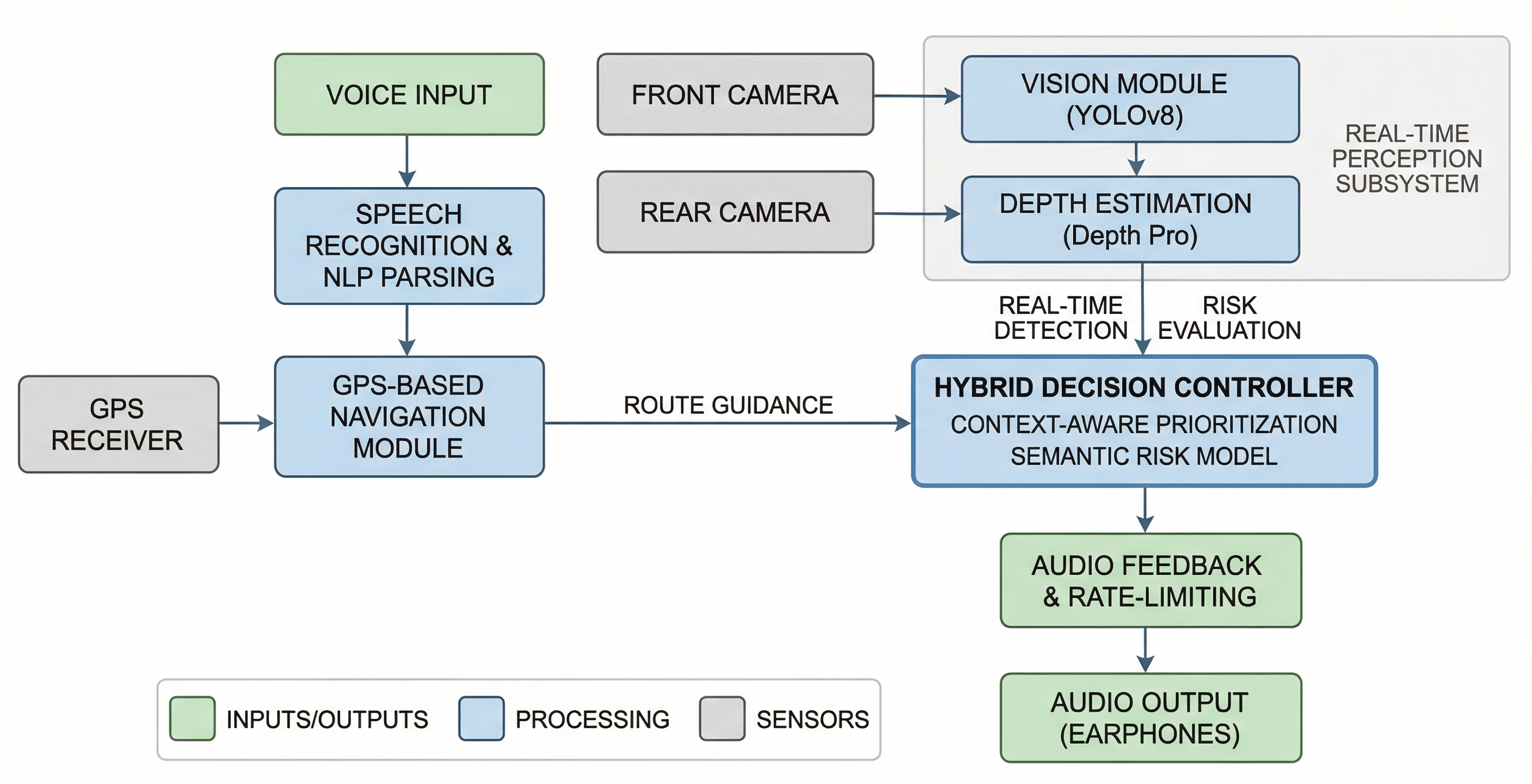
A voice-operated walking navigation and obstacle detection system for blind and visually impaired users. The user speaks a destination; the system gives turn-by-turn walking directions and alerts about obstacles directly ahead — entirely through audio.
Built for a laptop during development. Deployable to a Raspberry Pi with minimal changes.
- Introduction
- What the System Does
- Technology Stack
- Requirements
- Project Structure
- Installation
- Configuration
- Running the System
- Simulation Modes
- Raspberry Pi Deployment
- How Obstacle Detection Works
- Known Limitations
- Troubleshooting
- Extending the System
This project was built to assist blind and visually impaired individuals with independent navigation. Most navigation apps require looking at a screen. This system is fully voice-operated: you speak to it, it speaks back. No screen, no keyboard, no touch.
It combines two capabilities that run together in the same loop:
- Turn-by-turn walking navigation using free map data and a free routing engine
- Real-time obstacle detection using a USB webcam, object detection, and depth estimation
The project is written in Python 3 and uses only free tools — no paid APIs except Gemini, which has a free tier that is sufficient for this use case.
This repository is a part of my B.Tech Final Year Project and represents Module 3 of 7 of the complete system.
It focuses on building an AI-powered assistive navigation system for blind and visually impaired users using computer vision, GPS-based navigation, voice interaction, and Raspberry Pi-compatible deployment.
When you run python main.py:
- The system loads the obstacle detection models (takes ~30 seconds on first run due to weight downloads)
- The GPS tracker starts in the background
- The system speaks: "System ready. Waiting for GPS signal."
- The system asks: "Where would you like to go?"
- You speak a destination (e.g. "take me to Charminar")
- The system geocodes your destination using OpenStreetMap (Nominatim)
- If the destination is outside your city: the system says it would be better to take a ride, and exits. It will not try to route you across cities on foot.
- If the destination is within your city: it fetches a walking route from OSRM and begins navigation
- Every 5 seconds it checks: is there an obstacle directly ahead within 3 metres?
- If yes: Gemini generates a spoken alert. That alert is spoken before the next navigation instruction.
- You walk, it talks. It announces turns when you are close enough to act on them.
| Layer | Tool | Why |
|---|---|---|
| Speech-to-Text | SpeechRecognition + Google STT | Free, reliable, works with any USB mic |
| Text-to-Speech | gTTS + pygame | Natural-sounding, free |
| Geocoding | Nominatim (OpenStreetMap) | Free forever, no key needed |
| Routing | OSRM (public server) | Fully free, no API key |
| GPS | gpsd → USB serial → fallback | Works on both laptop and Pi |
| Object Detection | YOLOv8 (ultralytics) | Fast, runs on CPU |
| Depth Estimation | Depth Anything V2 (HuggingFace) | Best available free monocular depth model |
| Scene Narration | Gemini 1.5 Flash | Only called when a close obstacle is detected |
Python 3.10 or 3.11 only.
Python 3.13 is not supported. Several dependencies (torch, transformers, pyaudio) have not released wheels for 3.13. If you are on 3.13, use pyenv or conda to switch to 3.10.
python --version # Should show 3.10.x or 3.11.x| Component | Laptop | Raspberry Pi |
|---|---|---|
| Camera | USB webcam | USB webcam |
| Microphone | USB microphone | USB microphone |
| Speaker | Any speaker or headphones | 3.5mm speaker |
| GPS | USB GPS dongle or system GPS | USB GPS dongle (/dev/ttyUSB0) |
If no GPS hardware is found on the laptop, the system falls back to Hyderabad city centre coordinates. Navigation will still work — you just will not get live position tracking.
Required for: Google STT, gTTS, Nominatim geocoding, OSRM routing, Gemini API.
The navigation loop does not need internet after the route has been fetched, but TTS and STT always do.
VisionAssistant/
│
├── main.py               → Full system entry point
├── simulate_nav.py       → Simulation: prints turn-by-turn directions to console
├── simulate_detect.py    → Simulation: object + depth detection on a static image
│
├── config.py             → All tunable parameters in one place
│
├── tts.py                → Text-to-Speech (gTTS + pygame, thread-safe)
├── stt.py                → Speech-to-Text (SpeechRecognition + Google STT)
├── nlp.py                → Destination extractor (regex, no external NLP lib)
├── geocoder.py           → Nominatim geocoding + same-city check
├── router.py             → OSRM walking route fetcher → RouteStep list
├── gps_tracker.py        → GPS reader (gpsd / serial / Hyderabad fallback)
├── navigator.py          → Navigation engine: GPS position vs route steps
├── obstacle_detector.py  → Camera → YOLO → Depth → zone check → Gemini alert
│
├── requirements.txt
└── README.md
Each module has a single responsibility. config.py is the only file with hardcoded values — nothing else in the codebase hardcodes parameters.
Linux / Raspberry Pi:
sudo apt update
sudo apt install portaudio19-dev libatlas-base-dev gpsd gpsd-clients -y
macOS:
brew install portaudioWindows:
pip install pipwin
pipwin install pyaudiopip install -r requirements.txtThis will download torch and torchvision (~800 MB combined) plus all other packages. The first install takes several minutes.
Get a free key at: https://aistudio.google.com/app/apikey
Open config.py and paste it:
GEMINI_API_KEY = "your-key-here"Nothing to download manually. On first run:
- YOLOv8n weights (~6 MB) download automatically via ultralytics into
~/.ultralytics/ - Depth Anything V2 Small (~97 MB) downloads automatically via HuggingFace into
~/.cache/huggingface/
These are cached after the first download. Subsequent runs load from cache.
Everything is in config.py. The most important parameters:
| Parameter | Default | What it does |
|---|---|---|
GEMINI_API_KEY |
"YOUR_KEY" |
Your Gemini API key. Required. |
DEFAULT_CITY |
"Hyderabad" |
Used for same-city check (substring match on geocoded city name) |
OBSTACLE_DISTANCE_THRESHOLD |
3.0 |
Metres. Objects closer than this in the centre zone trigger an alert. |
OBSTACLE_CHECK_INTERVAL |
5 |
Seconds between camera captures. |
DEPTH_SCALE_FACTOR |
10.0 |
Converts relative depth to metres. Tune for your scene (see note below). |
YOLO_MODEL |
"yolov8n.pt" |
n = fastest. s, m, l, x = progressively more accurate but slower. |
TURN_ANNOUNCE_DISTANCE |
20 |
Metres before a waypoint at which the turn instruction is spoken. |
ARRIVAL_DISTANCE |
15 |
Metres from the destination at which arrival is announced. |
CAMERA_INDEX |
0 |
USB webcam device index. Change to 1, 2, etc. if camera not found. |
About DEPTH_SCALE_FACTOR: Depth Anything V2 outputs relative depth, not metres. The conversion is metres ≈ scale / relative_depth. Use 5–8 for indoor or close-up scenes, 10–20 for outdoor. Use simulate_detect.py on test images where you know the approximate real distances to calibrate this value.
python main.pyRequires microphone, speaker, internet, and USB webcam. GPS hardware is optional — Hyderabad fallback is used if none is found.
These let you test parts of the system without all the hardware.
python simulate_nav.pyNo microphone, no GPS, no speaker required. You type the destination. The system:
- Extracts the destination name using the same NLP module as the full system
- Geocodes it with Nominatim
- Runs the same-city check (try a destination outside Hyderabad to see the warning)
- Fetches the walking route from OSRM using Hyderabad city centre as origin
- Prints all steps with distances and estimated walking times
Example output:
[System] Where would you like to go?
  >> You: take me to Charminar

════════════════════════════════════════════════════════════════
  Route to: charminar
  Address : Charminar, Hyderabad...
  Distance: 4.23 km   |   Est. walk time: 52 min
════════════════════════════════════════════════════════════════

   1.  Head south onto Nampally High Road
       (120 m | 1 min)

   2.  Turn left onto MG Road
       (800 m | 9 min)

   ...

🏁  Arrive at charminar
After printing the route, it offers to try another destination.
# Default: uses test.jpg in the current folder
python simulate_detect.py

# Custom image
python simulate_detect.py --image street.jpg

# Custom output path
python simulate_detect.py --image test.jpg --output result.jpg

# Use the larger, more accurate depth model
python simulate_detect.py --image test.jpg --model Large

# Tune depth scale for indoor scenes
python simulate_detect.py --image test.jpg --scale 6.0

# More accurate YOLO model
python simulate_detect.py --image test.jpg --yolo-model yolov8s.pt

# Lower confidence threshold (more detections, more false positives)
python simulate_detect.py --image test.jpg --conf 0.3
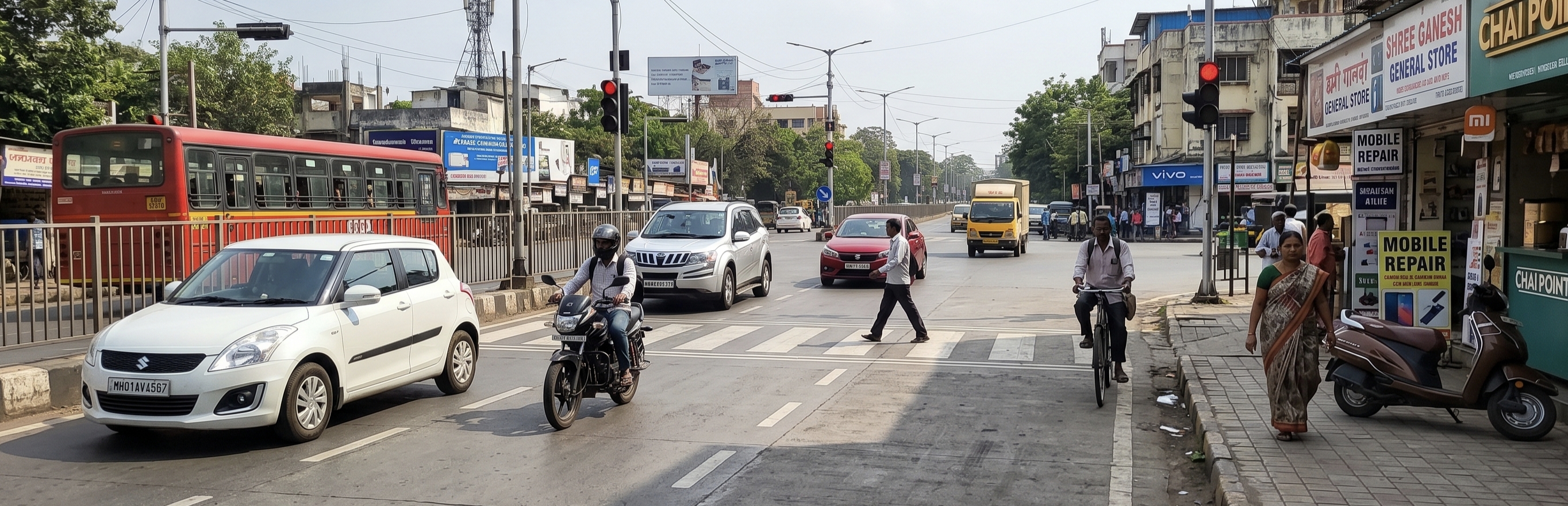
Place a test.jpg file in the project folder before running. Any photo works. A street scene with people, vehicles, or objects gives the most useful results.
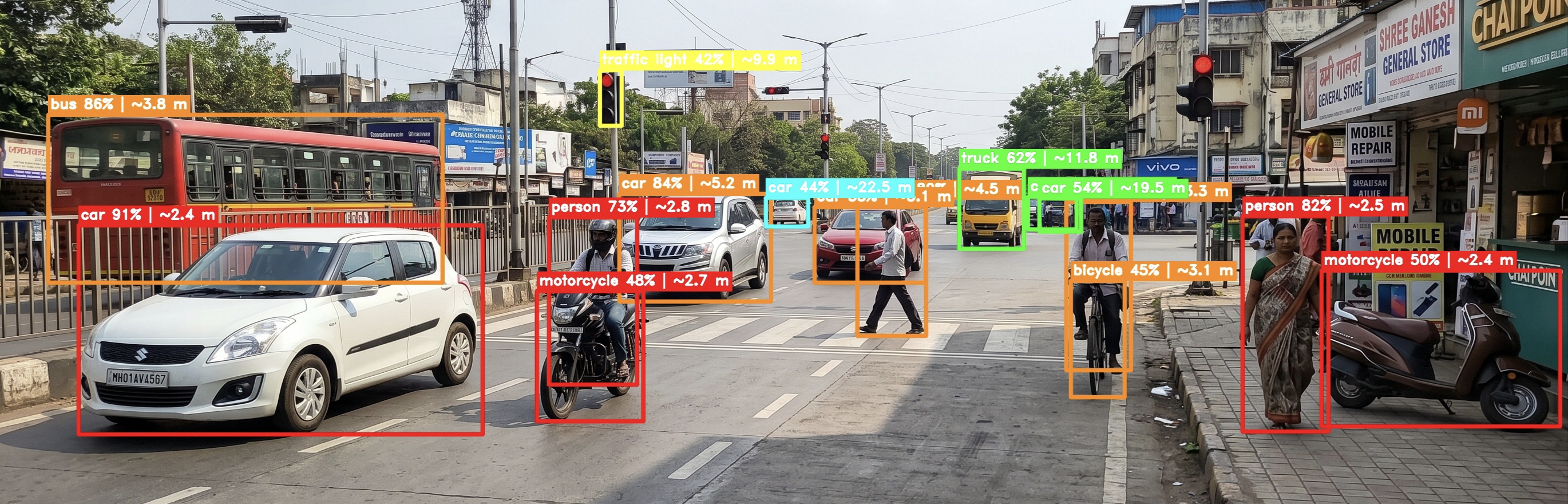
What it produces:
test_result.jpg — annotated image with:
- Bounding boxes colour-coded by distance (red < 3m, orange < 6m, yellow < 10m, green < 20m, cyan > 20m)
- Label on each box: object name, confidence, estimated distance, zone (LEFT / CENTRE ⚠ / RIGHT)
- Vertical lines marking the left-centre and centre-right zone boundaries
test_depth.jpg — false-colour depth map. Bright yellow/white = near. Dark purple/black = far.
Console summary:
── Detection Summary ────────────────────────────────────────────────
  #    Label                   Conf    Distance  Zone          Alert?
  ─    ─────                   ────    ────────  ────          ──────
  1    person                  87%    ~1.20 m   CENTRE ⚠      YES ⚠
  2    bicycle                 72%    ~3.40 m   LEFT          no
  3    car                     65%    ~8.70 m   RIGHT         no
────────────────────────────────────────────────────────────────────

  ⚠  CRITICAL: person directly ahead within 3.0 m — would trigger voice alert.
No audio is produced in this mode. It is for testing and demonstrating the detection pipeline only.
The laptop and Pi codebases are identical. Three things need to be changed.
# Remove the # from these two lines:
GPS_SERIAL_PORT  = "/dev/ttyUSB0"
GPS_BAUD_RATE = 9600Search for the comment marker:
# ── RASPBERRY PI: USB serial GPS ────────────────────────────────────────────
There are two blocks:
- One inside
_detect_source()— tests if the serial dongle is accessible - One full method
_run_serial()— reads NMEA sentences from the dongle
Uncomment both blocks.
pyserial
pynmea2
Then:
pip install -r requirements.txtThe default pip wheel for torch does not work on ARM. Use:
# Pi 4 (64-bit OS, aarch64):
pip install torch torchvision --index-url https://download.pytorch.org/whl/cpu

# Pi 3 (32-bit OS): use a community ARM wheel
# https://github.com/Kashu7100/pytorch-armv7lsudo apt update
sudo apt install portaudio19-dev libatlas-base-dev gpsd gpsd-clients -yDepth Anything V2 Small needs ~500 MB RAM. Pi 4 (2 GB+) handles it fine. Pi 3 (1 GB) may run out of memory. If you get memory errors, increase swap:
sudo dphys-swapfile swapoff
sudo nano /etc/dphys-swapfile    # set CONF_SWAPSIZE=2048
sudo dphys-swapfile setup
sudo dphys-swapfile swapon
GPS dongles need a clear outdoor sky view to acquire a satellite fix. Allow 1–2 minutes after plugging in. The has_fix field will be False until a fix is acquired. The system will speak a warning and use the fallback position until a fix comes in.
Every OBSTACLE_CHECK_INTERVAL seconds (default: 5):
- A frame is captured from the USB webcam
- YOLOv8 detects objects and bounding boxes
- Depth Anything V2 estimates a depth map for the entire frame
- Each object's distance is calculated as the 20th percentile of depth values inside its bounding box — this focuses on the nearest surface and ignores background pixels that bleed into the box edges
- The frame width is divided into three equal horizontal zones: Left, Centre, Right
- If any detected object is in the Centre zone and closer than
OBSTACLE_DISTANCE_THRESHOLDmetres:- A prompt is sent to Gemini with the obstacle details and full scene context
- Gemini returns a short spoken warning (1–2 sentences)
- The warning is spoken before the next navigation instruction
- Objects in Left or Right zones are not alerted on — they are not directly in the walking path
If Gemini fails for any reason (API error, no internet), the system generates a plain fallback alert string and speaks that instead. Obstacle detection does not crash if Gemini is unavailable.
These are real constraints of the current implementation.
Depth accuracy is approximate. Depth Anything V2 outputs relative depth. The DEPTH_SCALE_FACTOR calibration converts it to approximate metres but is not precise. Do not treat the distance values as accurate measurements — treat them as useful approximations for alerting purposes.
5-second detection gap. The camera is only checked every 5 seconds. Fast-moving obstacles can appear and get close between checks. Lowering OBSTACLE_CHECK_INTERVAL in config.py increases responsiveness at the cost of CPU usage.
Sequential loop — no threading. Navigation and obstacle detection share a single loop. A slow Gemini call (1–3 seconds typically) will delay the next GPS check by that amount. This is intentional: threading would require synchronisation to avoid overlapping speech.
Google STT and gTTS require internet. If the device goes offline mid-session, speech recognition falls back to text input and TTS prints to console rather than speaking.
GPS accuracy in urban areas. Cheap USB dongles give 3–5 metre accuracy in open areas. Tall buildings cause multipath interference that can be worse. The TURN_ANNOUNCE_DISTANCE of 20 metres is set to compensate, but navigation near dense buildings may be less smooth.
Same-city check is a name substring match. If the geocoded city field from Nominatim contains the configured DEFAULT_CITY string, the destination passes. This works for most cases but is not geographic boundary checking. The CITY_BBOX bounding box serves as a secondary check.
Nominatim coverage varies. Nominatim is OpenStreetMap-based. New constructions, local nicknames for places, and under-mapped areas may not geocode correctly. If a destination fails to geocode, try a more specific or formal name.
pyaudio install fails on Linux or Pi
sudo apt install portaudio19-dev -y
pip install pyaudio
pyaudio install fails on Windows
pip install pipwin
pipwin install pyaudio
No microphone found / OSError on start
stt.py automatically falls back to text input. To list available microphones:
python -c "import speech_recognition as sr; print(sr.Microphone.list_microphone_names())"Google STT fails with RequestError
Check your internet connection. Google STT is a network call.
No audio from speaker Test TTS in isolation:
python -c "from tts import speaker; speaker.speak('hello world')"Check system volume and speaker connection.
OSRM returns no routes Check internet. The public OSRM server occasionally has maintenance windows. Verify it is up: http://router.project-osrm.org
Nominatim returns None / geocoding fails
The destination name may be too short or ambiguous. Try a more specific name. Example: "Charminar Hyderabad" instead of "Charminar".
Gemini API error
Verify GEMINI_API_KEY is set correctly in config.py. The obstacle detector falls back to a plain alert string if Gemini is unavailable — the rest of the system keeps running.
Wrong camera opens / camera not found
Change CAMERA_INDEX in config.py to 1, 2, etc. To check which indices work:
python -c "import cv2; [print(i, cv2.VideoCapture(i).isOpened()) for i in range(5)]"GPS has_fix stays False
Take the device outdoors. Allow 1–2 minutes for a cold start. Test the dongle with cgps on Linux. On a laptop, check if your device has a built-in GPS or if gpsd is running.
Depth distances look wrong or completely off
Tune DEPTH_SCALE_FACTOR in config.py. Use simulate_detect.py on a test image where you know the real distances to objects. Adjust the scale until values look reasonable. Start with 6.0 for indoor, 12.0 for outdoor.
Out of memory on Raspberry Pi
Set YOLO_MODEL = "yolov8n.pt" and DEPTH_MODEL_SIZE = "Small" in config.py. Increase Pi swap to 2 GB (see Pi deployment section).
Python 3.13 import errors This project does not support Python 3.13. Downgrade to 3.10 or 3.11.
simulate_detect.py — "Image not found: test.jpg"
Place a test image named test.jpg in the project folder, or pass --image <path> to the script.
Change the city
In config.py:
DEFAULT_CITY      = "Chennai"
DEFAULT_CITY_FULL = "Chennai, India"
FALLBACK_LAT      = 13.0827
FALLBACK_LON      = 80.2707
CITY_BBOX = {
    "lat_min": 12.80, "lat_max": 13.25,
    "lon_min": 79.95, "lon_max": 80.50,
}
Offline TTS
Replace gTTS with pyttsx3 in tts.py for offline operation. Voice quality is robotic compared to gTTS:
import pyttsx3
engine = pyttsx3.init()
engine.setProperty('rate', 150)
engine.say(text)
engine.runAndWait()
Add new destination trigger phrases
In nlp.py, add a regex to _TRIGGER_PATTERNS. The destination must be in capture group 1:
r"bring me to\s+(.+)",
r"i need to reach\s+(.+)",
Self-hosted OSRM
For production deployment, host your own OSRM instance and update config.py:
OSRM_BASE_URL = "http://localhost:5000"Adjust obstacle sensitivity
- Lower
OBSTACLE_DISTANCE_THRESHOLD→ only alert when objects are very close - Raise
YOLO_CONFIDENCE→ fewer false detections from shadows and distant objects - Lower
OBSTACLE_CHECK_INTERVAL→ faster detection, higher CPU usage - Raise
CENTRE_ZONE_FRACTION(e.g.0.4) → wider centre zone, more sensitive
This project is intended for educational and research purposes.
T. Adithya Reddy